Deploy a Webhook connector
The Webhook channel allows you to interact with your assistant from any service, via HTTP requests.
Configuration
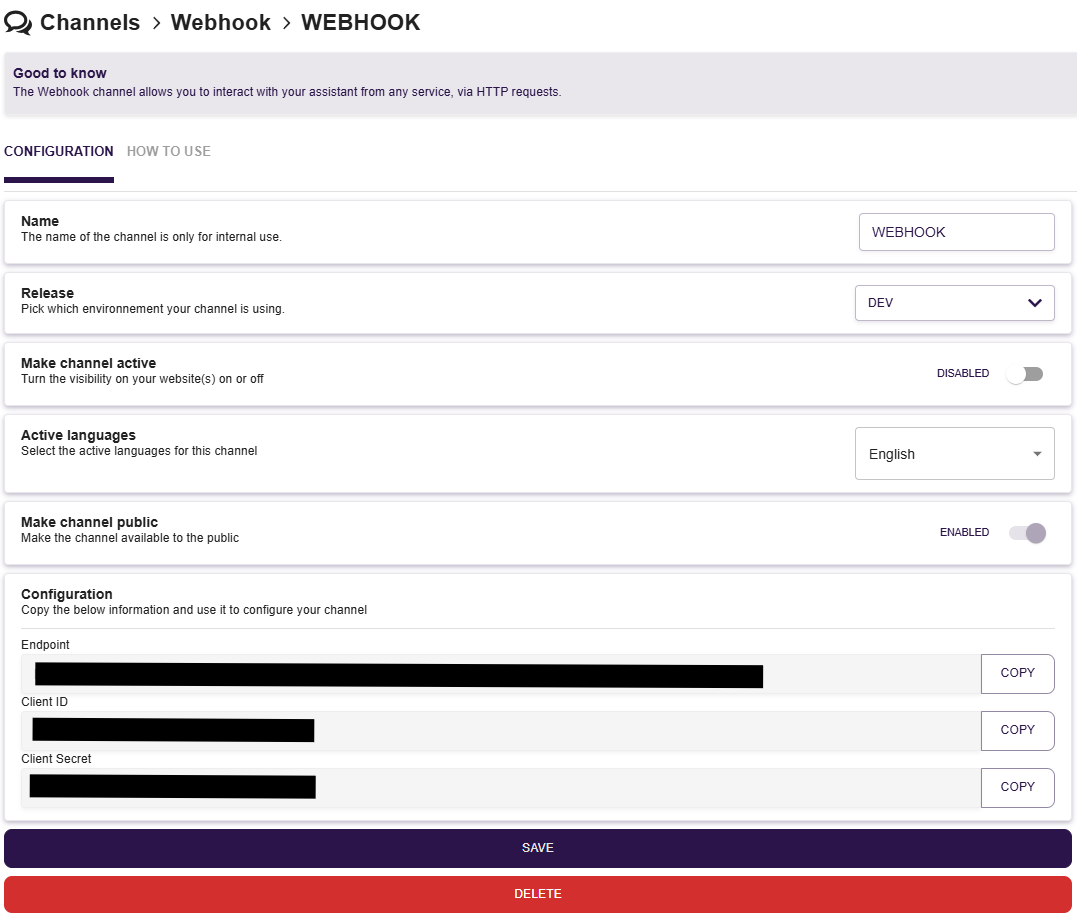
On this part, you can configure the settings of your webhook such as :
- Name of your channel : for internal use only
- Activation of your channel : enable this settings to make your channel active
- Active languages which can be select by your end-users
This configuration will also display the endpoint and secret that you need to connect to your webhook.
API Documentation
1. Start a new conversation : POST /startConversation
Description:
This endpoint starts a new conversation with the webhook channel of nAIxus. It requires a JSON payload in the body of the request.
URL:
<BASE_URL>/channels/webhook/<CLIENT_ID>/startConversation
For SaaS client, BASE_URL = https://conversation.naixus.ssai.ovh
CLIENT_ID can be found in the webhook configuration page
Method:
POST
Headers:
Content-Type: application/json
Request Body:
The body must be a JSON object containing the language and integration context. Below is an example of the request body:
{
  "language": "en_US",
  "integrationContext": {}
}
Example Request:
curl -X POST https://conversation.naixus.ssai.ovh/channels/webhook/<CLIENT_ID>/startConversation \
     -H "Content-Type: application/json" \
     -d '{
           "language": "en_US",
           "integrationContext": {}
         }'
Response:
{
  "conversation": {
    "conversation": {
      "id": "conversation_id",
      "eventStack": [
        {
          "type": "START",
          "data": {},
          "timestamp": "start_timestamp"
        },
        {
          "type": "BOT_MESSAGE",
          "data": {
            "content": "bot_message_content",
            "rawContent": "raw_bot_message_content",
            "suggestions": ["suggestion1", "suggestion2", "suggestion3"],
            "expectedResponseType": "expected_response_type",
            "sources": []
          },
          "timestamp": "message_timestamp"
        }
      ],
      "context": {
        "variables": {},
        "uploadedFiles": {},
        "channel": {
          "id": "channel_id",
          "version": "channel_version",
          "release": "channel_release",
          "languages": ["language1", "language2", "language3"],
          "channelType": "channel_type"
        },
        "language": "language_code",
        "shouldClassifyNextMessage": true,
        "digressionTypeNextMessage": "digression_type",
        "graphReaderConversationalStack": [
          {
            "status": {
              "executorType": "executor_type",
              "statusType": "status_type",
              "flagName": "flag_name"
            },
            "context": {}
          },
          {
            "status": {
              "executorType": "executor_type",
              "statusType": "status_type",
              "nodeId": "node_id"
            },
            "context": {
              "scenarioName": "scenario_name"
            }
          }
        ],
        "nextMessageExpectedType": "expected_message_type",
        "entities": []
      },
      "status": "conversation_status",
      "labelIds": [],
      "createdAt": "creation_timestamp",
      "updatedAt": "update_timestamp"
    },
    "newMessages": {
      "newEvents": [
        {
          "type": "BOT_MESSAGE",
          "data": {
            "content": "new_bot_message_content",
            "rawContent": "new_raw_bot_message_content",
            "suggestions": ["new_suggestion1", "new_suggestion2", "new_suggestion3"],
            "expectedResponseType": "new_expected_response_type",
            "sources": []
          },
          "timestamp": "new_message_timestamp"
        }
      ]
    }
  }
}
Explanation of Fields:
conversation_id: Unique identifier of the conversation.start_timestamp: Timestamp of the start of the conversation.bot_message_content: Content of the bot message in HTML format.raw_bot_message_content: Raw content of the bot message.suggestion1, suggestion2, suggestion3: Suggestions provided by the bot.expected_response_type: Expected type of response (e.g., textOrSuggestion).message_timestamp: Timestamp of the bot message.channel_id: Identifier of the channel.channel_version: Version of the channel.channel_release: Release version of the channel.language1, language2, language3: Languages supported by the channel.channel_type: Type of the channel.language_code: Language code used in the conversation.digression_type: Type of digression for the next message.executor_type: Type of executor of the status.status_type: Type of status.flag_name: Name of the scenario flag.node_id: Identifier of the node in the scenario.scenario_name: Name of the scenario.expected_message_type: Type of the next expected message.conversation_status: Status of the conversation.creation_timestamp: Timestamp of the conversation creation.update_timestamp: Timestamp of the conversation update.new_bot_message_content: Content of the new bot message.new_raw_bot_message_content: Raw content of the new bot message.new_suggestion1, new_suggestion2, new_suggestion3: New suggestions provided by the bot.new_expected_response_type: New expected type of response.new_message_timestamp: Timestamp of the new bot message.
Save the conversation_id to continue the conversation
2. Send a new message to an existing conversation : POST /newMessage
Description:
This endpoint continues the conversation by sending a new message. It requires the conversation ID obtained from /startConversation and the user's input.
URL:
<BASE_URL>/channels/webhook/<CLIENT_ID>/newMessage
For SaaS client, BASE_URL = https://conversation.naixus.ssai.ovh
CLIENT_ID can be found in the webhook configuration page
Method:
POST
Headers:
Content-Type: application/json
Request Body:
The body must be a JSON object containing the conversation ID and the user's input. Below is an example of the request body:
{
  "conversationId": "conversation_id",
  "userInput": "userInput"
}
Example Request:
curl -X POST https://conversation.naixus.ssai.ovh/channels/webhook/<CLIENT_ID>/newMessage \
     -H "Content-Type: application/json" \
     -d '{
           "conversationId": "bd5ef5dd-80ba-4af7-9246-17f6cd8029fe",
           "userInput": "I want to raise an incident"
         }'
Response:
{
  "conversation": {
    "newEvents": [
      {
        "type": "BOT_MESSAGE",
        "data": {
          "content": "bot_message_content",
          "rawContent": "raw_bot_message_content",
          "suggestions": ["suggestion1", "suggestion2", "suggestion3"],
          "expectedResponseType": "expected_response_type",
          "sources": []
        },
        "timestamp": "event_timestamp"
      }
    ]
  }
}
Explanation of Fields:
bot_message_content: Content of the bot message in HTML format.raw_bot_message_content: Raw content of the bot message.suggestion1, suggestion2, suggestion3: Suggestions provided by the bot.expected_response_type: Expected type of response (e.g., suggestion).event_timestamp: Timestamp of the event.
Notes
- Both endpoints do not require any form of authorization.
- Make sure to replace CLIENT_ID and BASE_URL with the actual configuration of your webhook endpoints.
- Ensure that the conversation ID from the response of Endpoint 1 is used correctly in the request body of Endpoint 2 to continue the conversation.
This documentation should help you understand how to interact with the webhook API endpoints effectively.