πŸš€ 1.7.0

Β· 2 min read
Caroline BOYER
Caroline BOYER
Senior Technical Leader

nAIxus 1.7.0 lights up your workspace with faster collaboration, smarter conversations, and brand-new ways to flex your LLM muscle. Dive in below!

✨ Highlights​

  • Scenario Builder, re-imagined A ground-up refactor delivers snappier load times, rock-solid autosave, and a sleek Block Creation menu that gets ideas flowing in seconds.

  • Statitics, re-imagined You guessed it, we gave a lot of time, thoughts and sweat on refactoring core modules to give it a more modern look and feel, easy user experience. Can't wait to hear what you think.

  • Open Prompt block Drop our new block anywhere in a flow to fire off free-form prompts to your configured LLMβ€”great for rapid prototyping, creative generation, or last-minute tweaks.

  • Admin-grade user management Add, deactivate, or reassign teammates from a single pane. Fewer tickets, faster onboarding, more control.

  • Built-in β€œWhat’s New” feed Release notes now surface right inside the app, so the whole team stays in the loop without leaving their workspace.

πŸš€ 1.6.0

Β· 4 min read
Gwendoline BRIERE
Gwendoline BRIERE
Functional Expert
Caroline BOYER
Caroline BOYER
Senior Technical Leader

πŸš€ Features​

✨ SharePoint RAG Connector​

We’re excited to introduce the SharePoint RAG Connector, allowing assistants to ingest documents directly from a SharePoint document baseβ€”bringing enterprise content into your retrieval-augmented generation (RAG) workflows.

This new connector is now available in the nAIxus platform as a native source type, enabling quick and secure integration with your Microsoft 365 environment.

Key Functionalities​

  • New Source Type:

    A new β€œFrom SharePoint” connector tile is available when creating a knowledge source, alongside files, web pages, and other integrations.

  • Secure OAuth2 Setup:

    Connect using Microsoft Azure credentials by providing:

    • Client ID
    • Tenant ID
    • Client Secret
    • Site ID

    The connector supports three authentication flows: Client Secret, Client Certificate and Client Credentials.

  • Direct Document Ingestion:

    Once configured, documents stored in the specified SharePoint drive are ingested and made available to the assistant for grounding answers with enterprise knowledge.

Simple, Secure, Integrated​

  • No custom code or manual upload needed
  • Direct access to structured knowledge in SharePoint libraries
  • Designed for extensibilityβ€”future enhancements will include folder-level scoping and sync options

This connector unlocks the value of your internal content, making SharePoint a first-class citizen in your AI-powered knowledge ecosystem.

Let’s bring your internal content to life πŸš€

✨ Expanded Entity Management​

Say hello to a smarter way to manage your entities. With the Expanded Entity Management feature, we've redesigned how entities are accessed, edited, and curatedβ€”making dataset refinement smoother than ever.

Whether you're working on small vocabularies or handling large, dynamic lists, you now have the tools to maintain entity quality without friction.

Key Functionalities​

  • Centralized Access via Training Section:

    All defined entities are now easily accessible from the Training section, alongside intents and expressions. This provides a unified view of your assistant’s language model and simplifies curation workflows.

  • New Entities Drawer:

    A powerful, reimagined interface allows you to:

    • Search entities instantly, with real-time results thanks to smart debounce handling
    • Edit entity values on the fly, without navigating away
    • Navigate through paginated views, perfect for managing large entity sets
  • Optimized for Speed and Scale:

    Whether you're handling 10 or 10,000 entities, the drawer is optimized for performance and built to scale with your assistant.

Designed for Productivity​

  • No more endless scrolling or clunky navigation
  • Changes are instantly reflected across datasets and training flows
  • Built with feedback from power users to streamline everyday tasks

This update makes entity management faster, clearer, and more scalableβ€”bringing you closer to a high-performing assistant with every edit.

πŸš€ 1.5.1

Β· One min read
Gwendoline BRIERE
Gwendoline BRIERE
Functional Expert
Caroline BOYER
Caroline BOYER
Senior Technical Leader

🌟 Improvements​

  • Updated the models of the WatsonX provider. Added depreciated tag on depreciated models.
  • Scenario :
    • Added look and feel on context variables in block preview.
    • Updated look and feel for condition block preview
    • Updated look and feel for SAY and ASK block preview when the text is very long.

πŸ› Fixes​

  • Fixed an issue where screen would freeze when updating the theme of a webchannel
  • Fixed issue with generating scenario and utterances when using WatsonX provider.
  • Minimap on Scenario now correctly displays

πŸš€ 1.5.0

Β· 4 min read
Gwendoline BRIERE
Gwendoline BRIERE
Functional Expert
Caroline BOYER
Caroline BOYER
Senior Technical Leader

πŸš€ Features​

✨ Feedback Campaign Management​

We are thrilled to introduce a new capability in nAIxus: Feedback Campaign Management, empowering administrators to seamlessly collect user insights throughout any intelligent assistant scenario. Administrators can now create and manage feedback campaigns directly within the nAIxus console to capture Customer Satisfaction Score (CSAT) ratings. This marks the first step in a broader feedback strategy (NPS and binary feedback types coming soon).

Key Functionalities​

  • Campaign Lifecycle:

    A feedback campaign can be in one of three states:

    • Draft – editable, but not yet active
    • Published – active and available for feedback collection
    • Closed – archived and no longer accepting responses
  • Embedded Feedback Collection:

    Via a new dedicated step-block, administrators can prompt users for feedback at any point in a process, by linking to a published campaign.

  • Campaign Analytics Dashboard:

    Track:

    • Number of feedback requests sent and responses received
    • Response breakdown (score distribution from 1 to 5)
    • Real-time CSAT score
    • Anonymous comments with timestamps
    • Scenario traceability: where and when feedback was collected

Smart Design, Future-Ready​

  • Fully integrated into scenario flows via drag-and-drop blocks
  • Alerts guide the admin if an unpublished campaign is selected
  • Designed with extensibility in mind: future updates will support timed expirations, additional feedback types (NPS, binary), and enhanced data visualizations (e.g. average score heatmaps per scenario)

This new feature reinforces nAIxus' mission to combine predictive, generative, and soon agent-based AI with robust user-centric insightsβ€”allowing your assistant to learn, adapt, and improve continuously.

Let us know how you feel about it πŸ˜‰

✨ NLP Training Import Feature Update​

We are pleased to announce enhancements to the NLP Training Import functionality in our latest release:

NLP Training Import Feature Update

Improvements:​

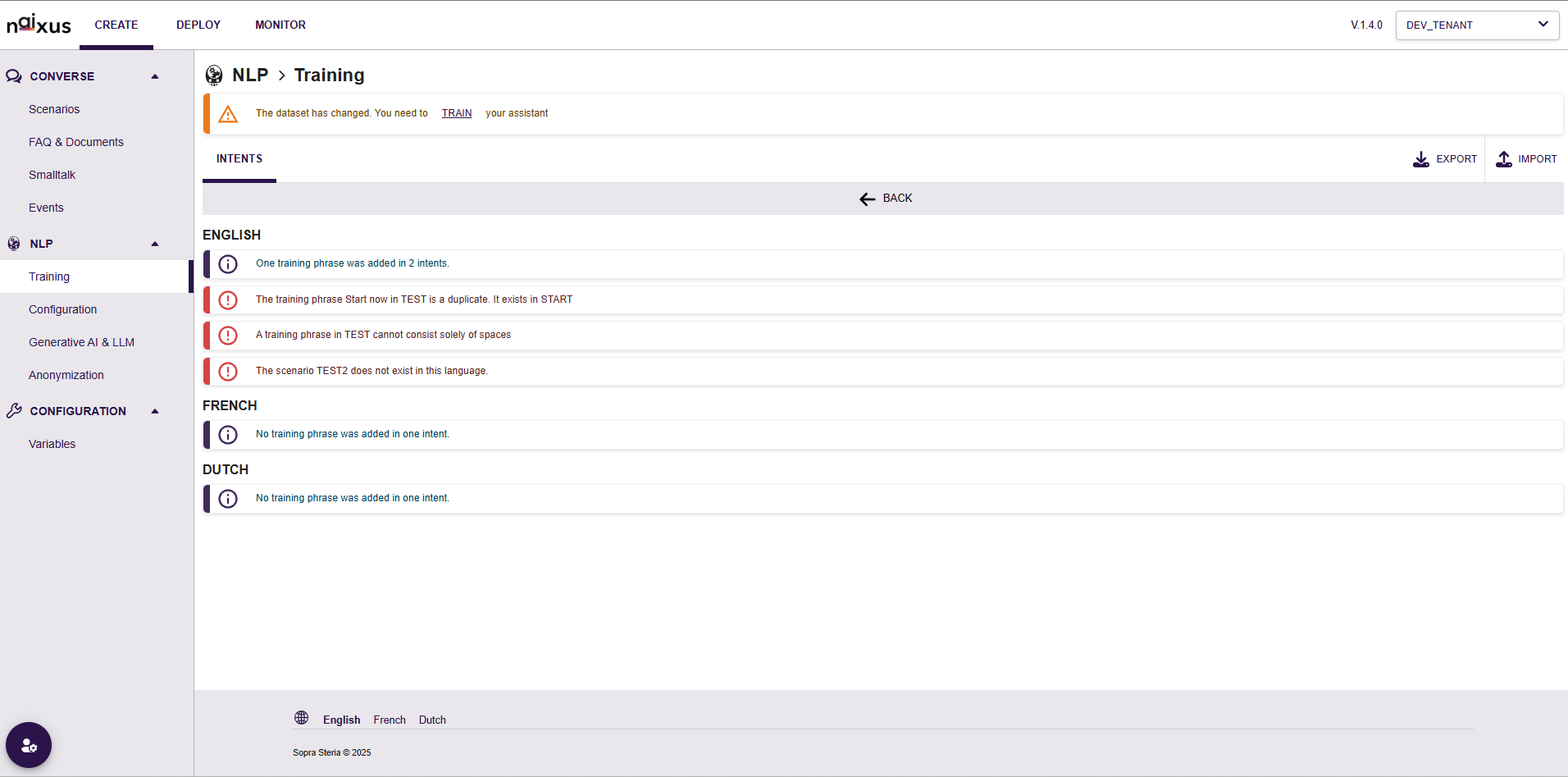
  • Enhanced validation checks for imported training phrases, providing clearer, actionable feedback to users.
  • Multilingual support now distinctly organized by classifier enabled locales, facilitating easier management of language-specific intents.

Validation Enhancements:​

  • Duplicate Detection: Training phrases existing in multiple intents are now clearly flagged.
  • Whitespace Validation: The system now prevents importing training phrases composed solely of whitespace characters.
  • Scenario Validation: Users are clearly informed if a referenced scenario does not exist in the specified language.

We recommend reviewing your NLP data following import to ensure accuracy. As always, remember to retrain your virtual assistant after modifying the NLP training data.

✨ Omnichannel Updates​

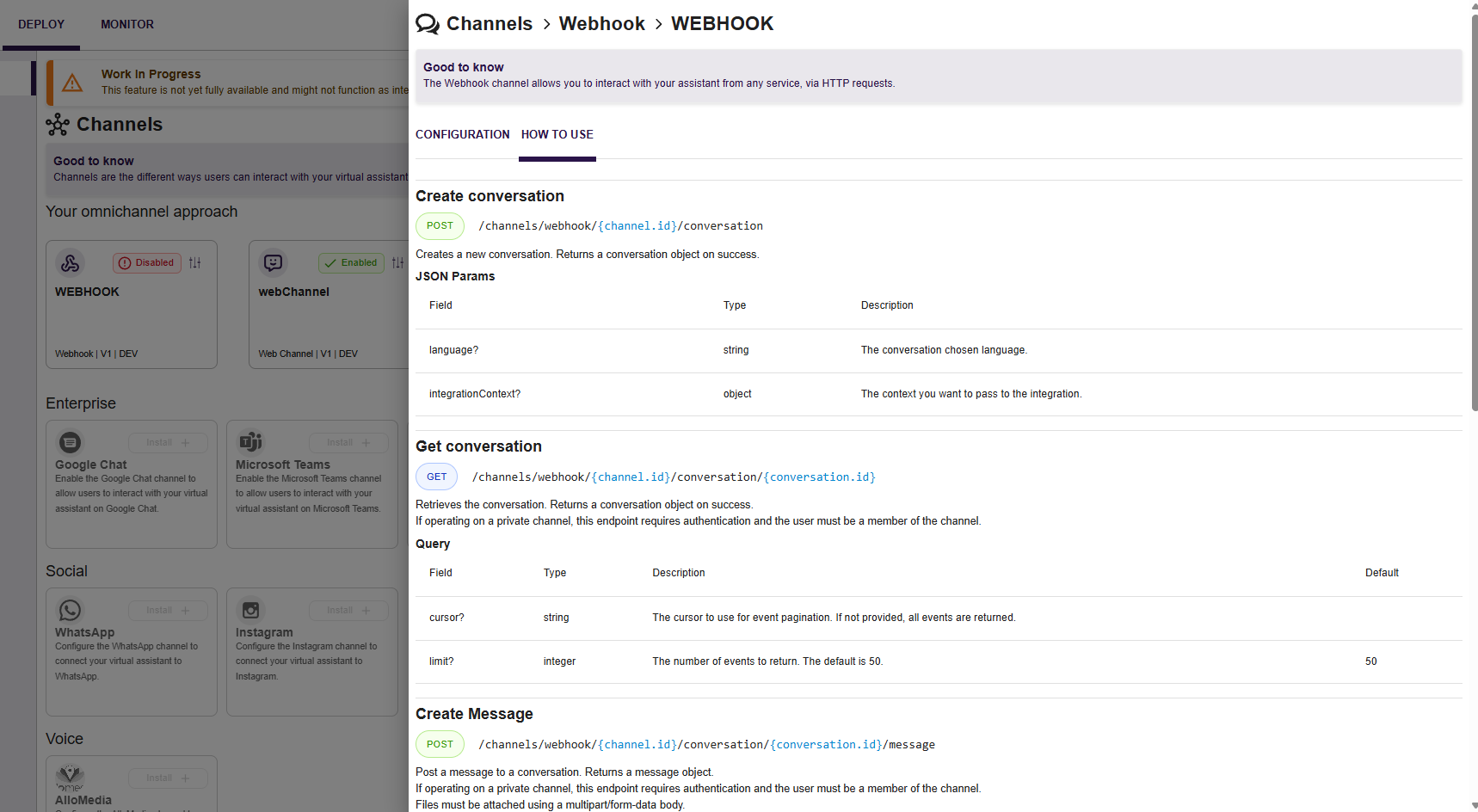
Webhook Channel: API guide documentation is now directly available within the "How to Use" tab, enhancing ease of integration. Please note the documentation is only available in English.

Omnichannel Updates

πŸš€ 1.3.0

Β· 2 min read
Gwendoline BRIERE
Gwendoline BRIERE
Functional Expert
Caroline BOYER
Caroline BOYER
Senior Technical Leader

πŸš€ Features​

✨ Agents​

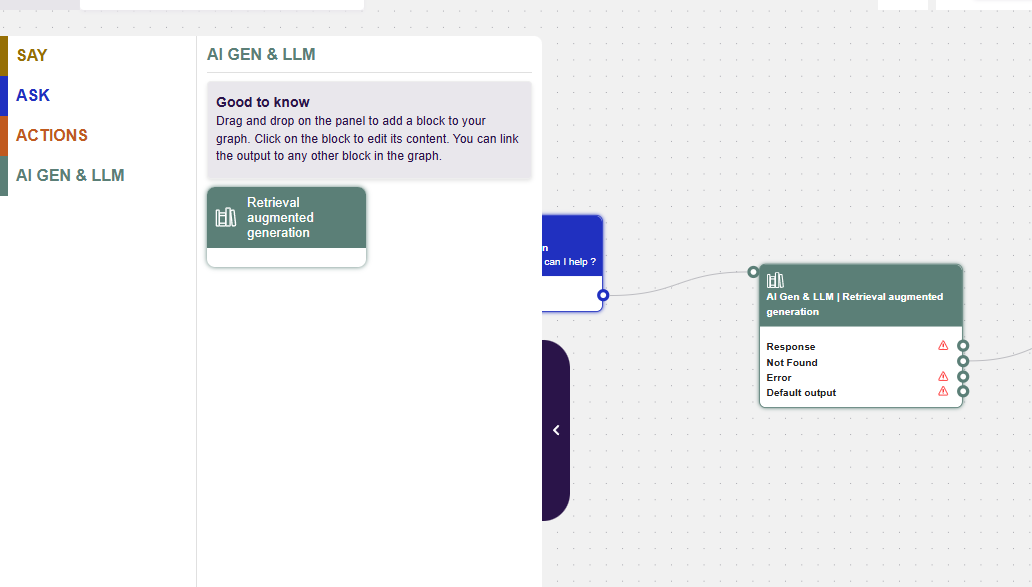
We are welcoming agents to our families of Blocks. We will start with the great Retrieval Augmented Generation block, allowing your to search among any Knowledge Base created in the Knowledge Module.

We hope to later add Reasoning Agents, Redacting Agents, Summarizing Agents, Free-Prompting Agents and much more…

New Scenario Editor

✨ Transcripts Renewed​

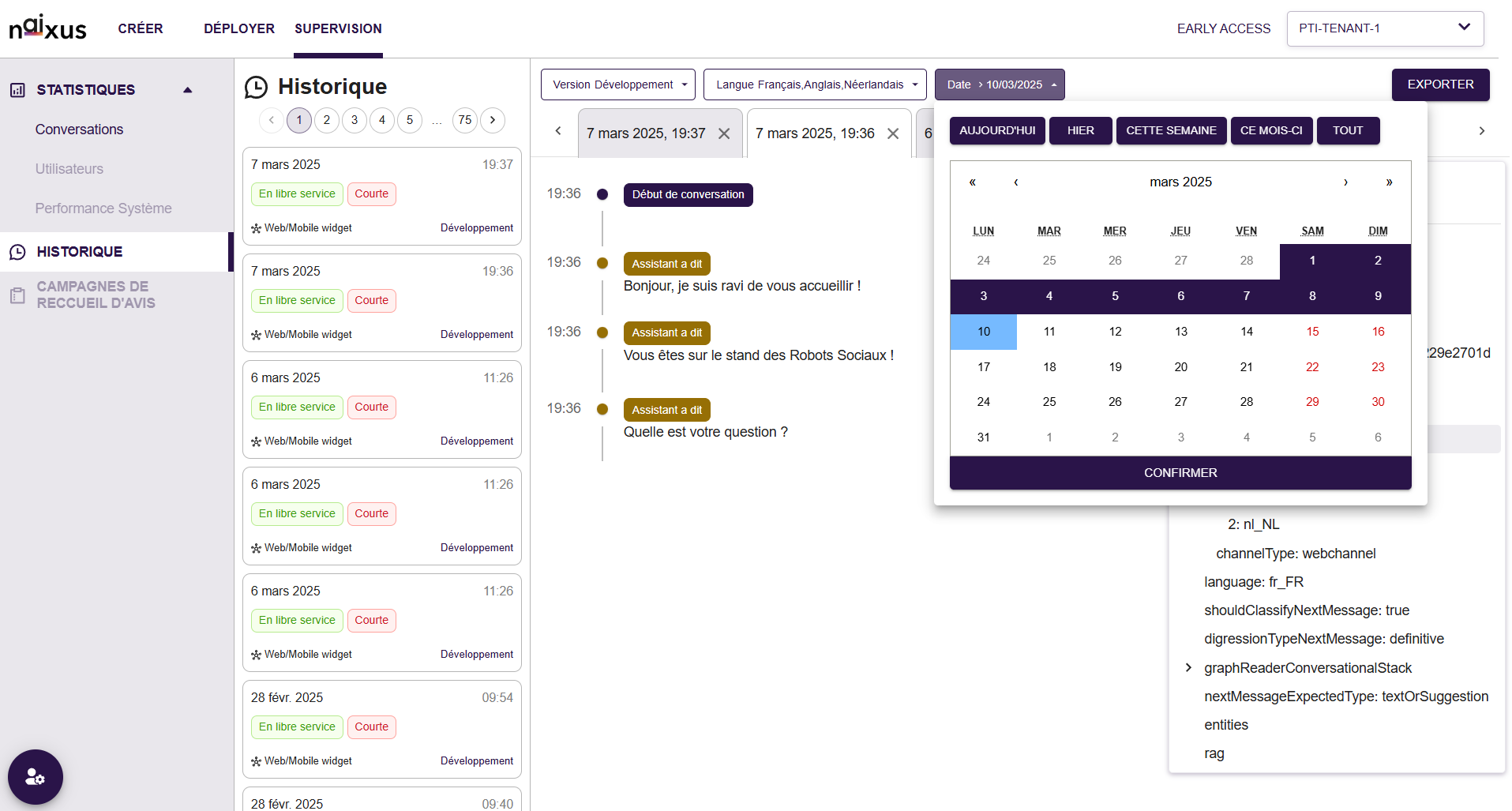
We're excited to introduce the newly redesigned interface, delivering an improved and more intuitive user experience!

What's New:​

  • Enhanced Historical View: Conversations are clearly organized by date and time, with quick visual indicators showing conversation status, platform used (web/mobile), and service type.
  • Interactive Filtering Options: New user-friendly filters allow quick selection of languages, date ranges and release mode, simplifying historical conversation retrieval and analysis.
  • Improved Conversation View: Clear visual cues for conversation flow and assistant interactions. Easily identifiable timestamps and detailed interaction indicators.

We look forward to your feedback as you explore this new experience!

New Scenario Editor

✨ Enhanced Webchannel UI​

We've updated the Webchannel by removing the β€œblock effect” around assistant messages, creating a cleaner, more modern user experience.

Additional personalization enhancements will follow in a future release.

New Scenario Editor

πŸš€ 1.2.1

Β· 2 min read
Gwendoline BRIERE
Gwendoline BRIERE
Functional Expert
Caroline BOYER
Caroline BOYER
Senior Technical Leader
warning

We are disabling for now the publish features until we can investigate on some mean bugs and rework User Experience. This also means that until we enable this feature, any changes made will have DIRECT impact on your channels.

Note : Statistics have been updated to match dev environment trafic and testing.

πŸš€ Features​

✨ New Editor​

We reviewed our editor, which to be honest was horrible for us to manage. Easier management, more features, what’s not to ask for ? We added great functionnalities along the way, just because 😎

  • Quick action menu on text selection
  • Quick action menu on new empty line
  • Adding a cursor when drag and dropping element from within the editor
  • Adding image from a URL
  • History management : undo and redo for ever !
  • Lists : ordered, unordered, task

New Scenario Editor

πŸš€ 1.2.0

Β· 3 min read
Gwendoline BRIERE
Gwendoline BRIERE
Functional Expert
Lucas KOENIG
Lucas KOENIG
Technical Leader

πŸš€ Features​

✨ Condition Block​

  • New Action Block Type allowing scenario designers to make decisions based on context variables values

✨ Publish​

Environment variables​

You can now create new environment variables that are common to all scenarios. Those variables can be used freely in blocks.

Versioning​

A tenant now allows for two environments to coexists allowing users to safely work on their scenarios without altering production capabilities :

  • DEVELOPMENT which corresponds to your current work environment. All your actual compatible (see below) components will be marked as
  • PRODUCTION which is mostly read-only and so is isolated from changes made in development as it can only be modified through a publish action.

Versioned components are:

  • Scenarios
  • NLP Configuration
  • LLM Configuration
  • Anonymizations
  • Smalltalk
  • Channels
  • Environment Variables

Publish​

  • Publishing is the action of deploying your dev environment in production and making it accessible for your production channels.
  • It will replace all your PRODUCTION components by what is in DEVELOPMENT. (Scenarios needs to be on State READY as well to be published). Except for Environment Variables that need to be modified manually every time.
  • It is an destructive action, meaning that once the publish is started, it may not be possible to revert back to a previous state. Proceed with caution.

πŸš€ 1.1.0

Β· 3 min read
Gwendoline BRIERE
Gwendoline BRIERE
Functional Expert
Lucas KOENIG
Lucas KOENIG
Technical Leader

πŸš€ Features​

✨ Statistics​

  • Can see which scenario have been triggered on a selected timeframe. Not retroactive, it will only starts collecting data from new version onwards

✨ Entities​

Detection​

  • Users can use β€œAsk Entity” blocks in which they can ask users for certain entities. Recognition is done using IA for NER (named-entity recognition) or by patterns using a list or a regex and store entities extracted from the answer in a variable.
  • Available entities are:
    • List
    • Regex
    • Date (NER)
    • Time (NER)
    • Phone (NER)
    • Number (NER)
    • Currency (NER)
    • Email (NER)
    • URL (NER)
    • Name (NER)
    • Address (NER)
    • City (NER)
    • Country (NER)
    • Location (NER)
    • Timezone (NER)
    • Language (NER)

Anonymization​

  • Users can define entities to be anonymized and choose values to replace those in three independent cases: RAG calls, classifier calls or in the DB when the conversation is over.
  • Available entities is the same as above.

πŸš€ What’s new | 1.0.0

Β· 5 min read
Gwendoline BRIERE
Gwendoline BRIERE
Functional Expert
Caroline BOYER
Caroline BOYER
Senior Technical Leader

Enhanced Scenario Creation and Generative AI Integration​

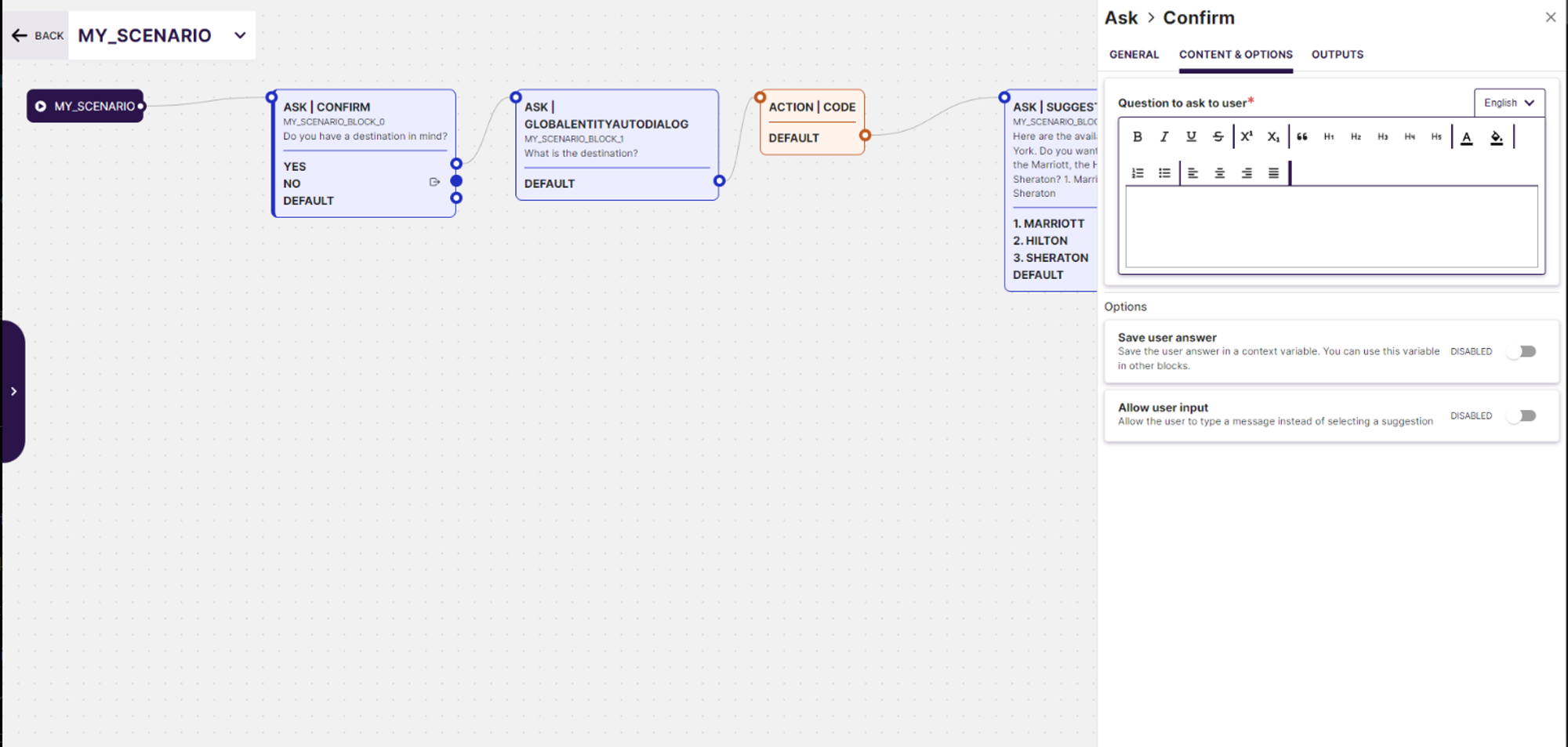
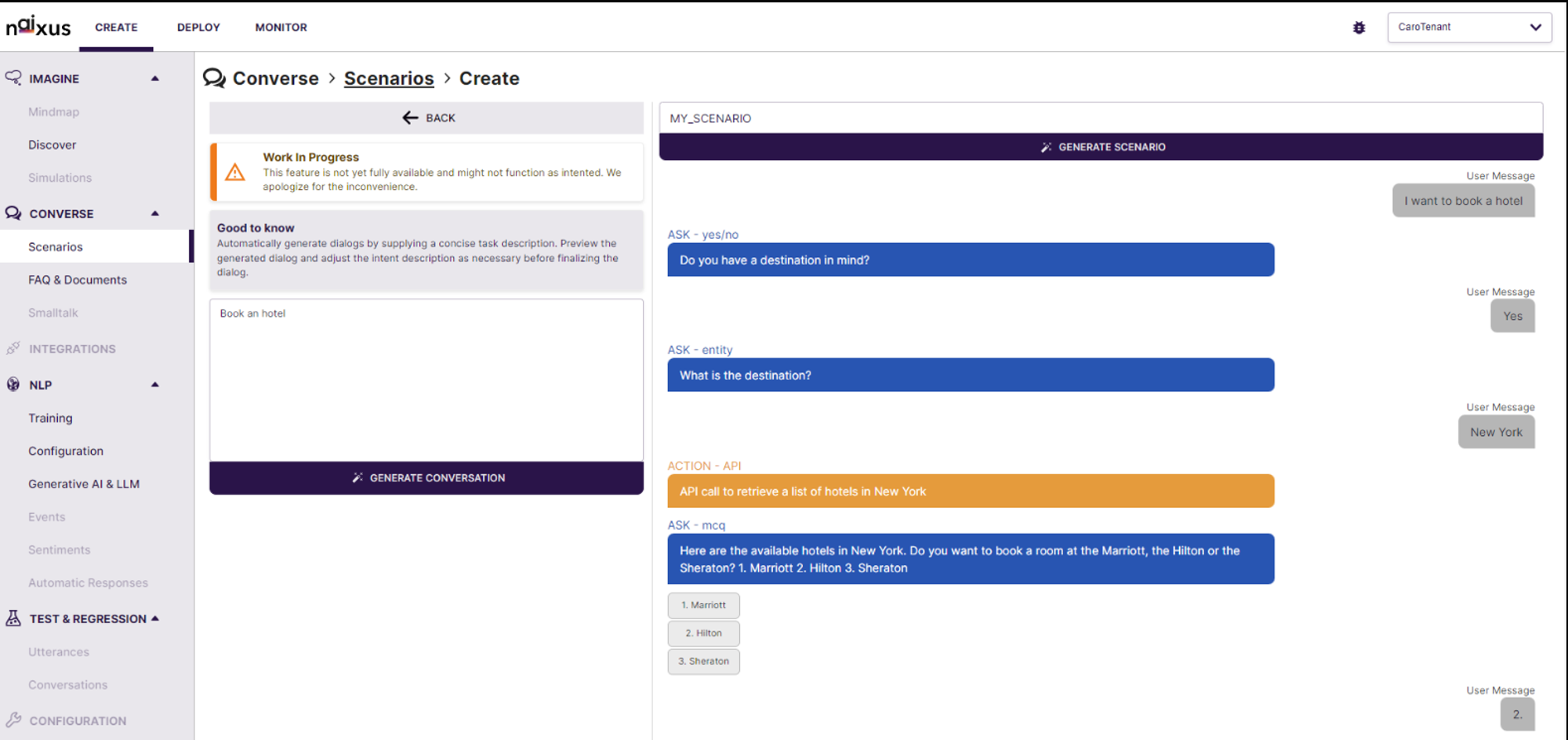
Dynamic Scenario Building: Users can now create detailed conversational scenarios in the "Converse > Scenarios > Create" section. This feature supports intuitive creation and management of dialogue sequences, enabling users to define and refine conversational flows effectively. Dynamic Scenario Building Generative AI Preview: Leverage cutting-edge Generative AI technology to automatically generate dialogue previews based on specified use cases. This tool helps visualize and optimize the conversation flow before finalizing the scenario, ensuring a more effective user interaction. Generative AI preview Real-time Editing and Simulation: The interface provides real-time editing capabilities along with a simulation environment that shows how the AI will interact in various conversation scenarios. Users can immediately test and tweak the generated dialogues, enhancing the development process and ensuring higher accuracy and relevance in real-world applications.